Time & Attendance
Flexible time capture for every workforce
Asure Time & Attendance offers flexible, intuitive time capture solutions—including hardware clocks (biometric, PIN, badge), software-based web clocking, mobile apps, and telepoint—to streamline workforce management and compliance as your business grows.

Hardware Clocks
Biometric, PIN, and badge options
Web & Mobile
Clock in from any device
Wi-Fi & Ethernet
Flexible network connectivity
Time Clocks
Asure time clocks and setup instructions
Choose the time clock that fits your workplace. From feature-rich touchscreen devices to streamlined PIN-entry terminals, every clock connects to the Asureforce timekeeping software.
Featured
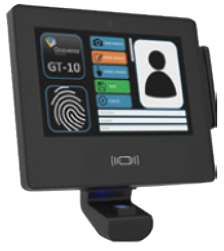
Touchscreen
Asure Elite Time Clock
A feature-rich, touchscreen-enabled time clock designed for high-traffic workplaces.
- Multiple Authentication: PIN, barcode badge, biometric fingerprint, and proximity badge options
- Self-Service Functions: Employees can view schedules, timecards, and accruals
- Advanced Reporting: Keeps accurate records for payroll and labor law compliance
- Network Connectivity: Supports Wi-Fi and Ethernet
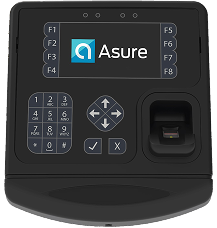
Biometric
Asure Basic Biometric Time Clock
A cost-effective biometric clock with simple yet powerful features.
- Biometric Authentication: Secure fingerprint-based clock-in/out, including PIN entry
- User-Friendly Interface: Employees enter their ID and scan their fingerprint for quick punches
- Compact & Durable: Ideal for small to mid-sized businesses
- Network Connectivity: Supports Wi-Fi and Ethernet
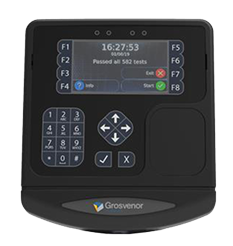
PIN Entry
Asure Basic Pin Entry Time Clock
A streamlined PIN-based time clock for businesses that don't require biometrics.
- PIN Entry: Employees clock in and out using unique PINs
- Easy to Use: Simple, efficient, and reliable for fast clock-in
- Secure & Accurate: Reduces time theft while ensuring accurate records
- Network Connectivity: Supports Wi-Fi or Ethernet
Support
Time clock FAQ
Common questions about setup, connectivity, and daily operation of Asure time clocks.
Yes, both the Elite and Basic clock will adjust for Daylight Savings automatically.
Powering off the clock for 2 minutes and then powering it back on is always a good first step. Once the clock powers on allow 15 minutes and then check to see if the punches have transmitted. You can also talk to your IT department to verify your network connection is working properly.
Get Help
Service contact information
Phone Support
888-323-8835 Option 3, then 4Next step
Request a demo and see how Asure can transform your workforce management
Whether you need hardware clocks, mobile apps, or web-based solutions, Asure Time & Attendance scales with your workforce. Talk to a specialist to find the right fit.